How it works Hooks, git notes, the open standard Toolkit Live · Burndown · Menubar · CLI Coach Personal AI Usage Coach — local-first DORA Roadmap Now · Next · Later · Exploring Pair with Microsoft Copilot The outcome layer for your Copilot Power BI Compare vs git-ai, DX, LinearB, Faros Whitepaper A framework for AI code observability Pricing

THE COMPLETE TOOLKIT

Every instrument. One install.

Per-line attribution is the core. The toolkit is what makes it operational — live activity, cost, trends, the menubar, the CLI. All of it ships in the box.

REAL-TIME

Live SSE dashboard

Watch every AI session as it happens. Tokens, cost, current file, current model — streamed live to your browser via Server-Sent Events.

  • Per-session cost and token burn
  • Current activity table — file by file
  • Daily / weekly / monthly trend charts
$ iria-monitor live
localhost:8765 — Claude Code Live Tokens
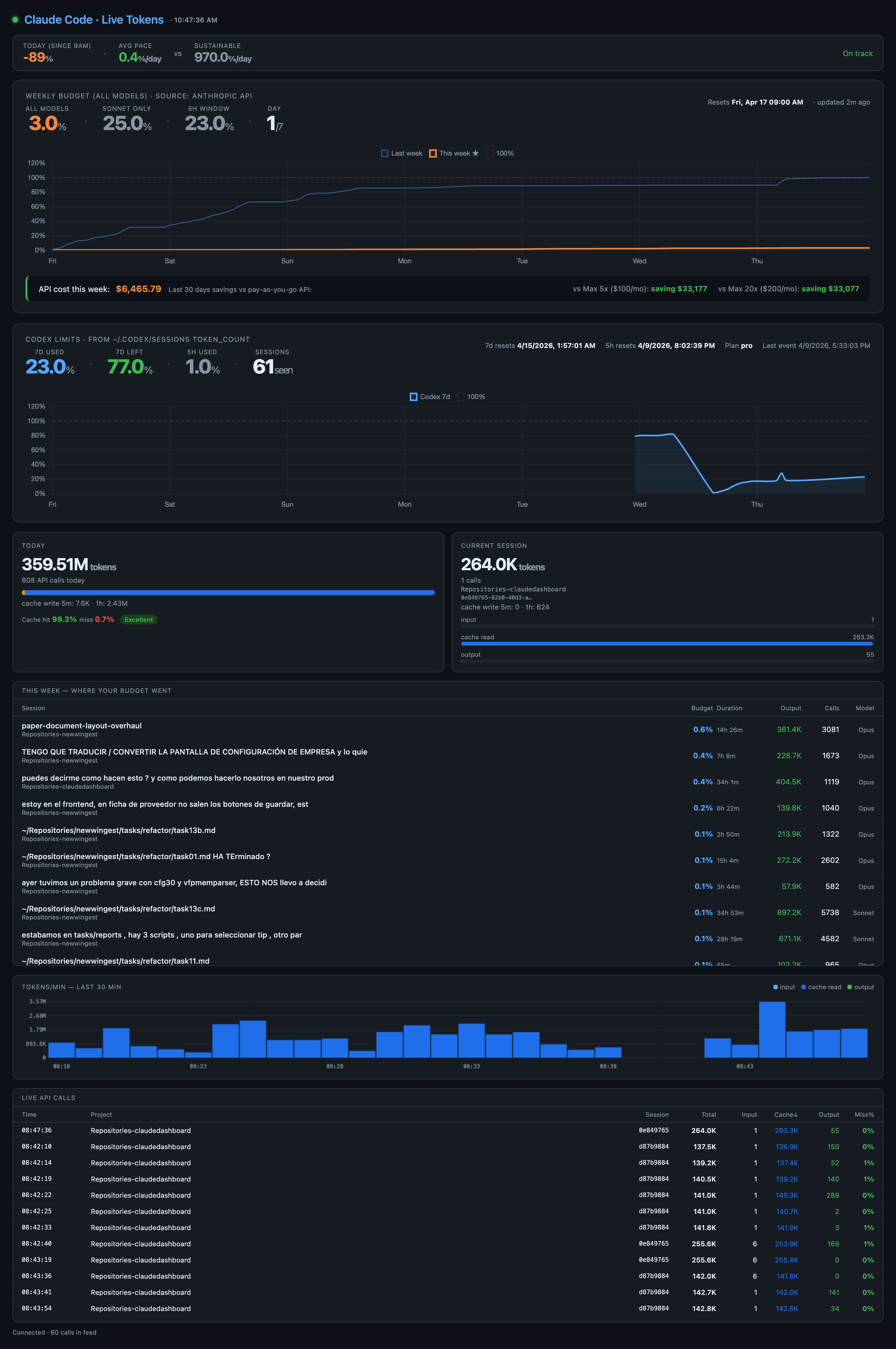
Live SSE dashboard
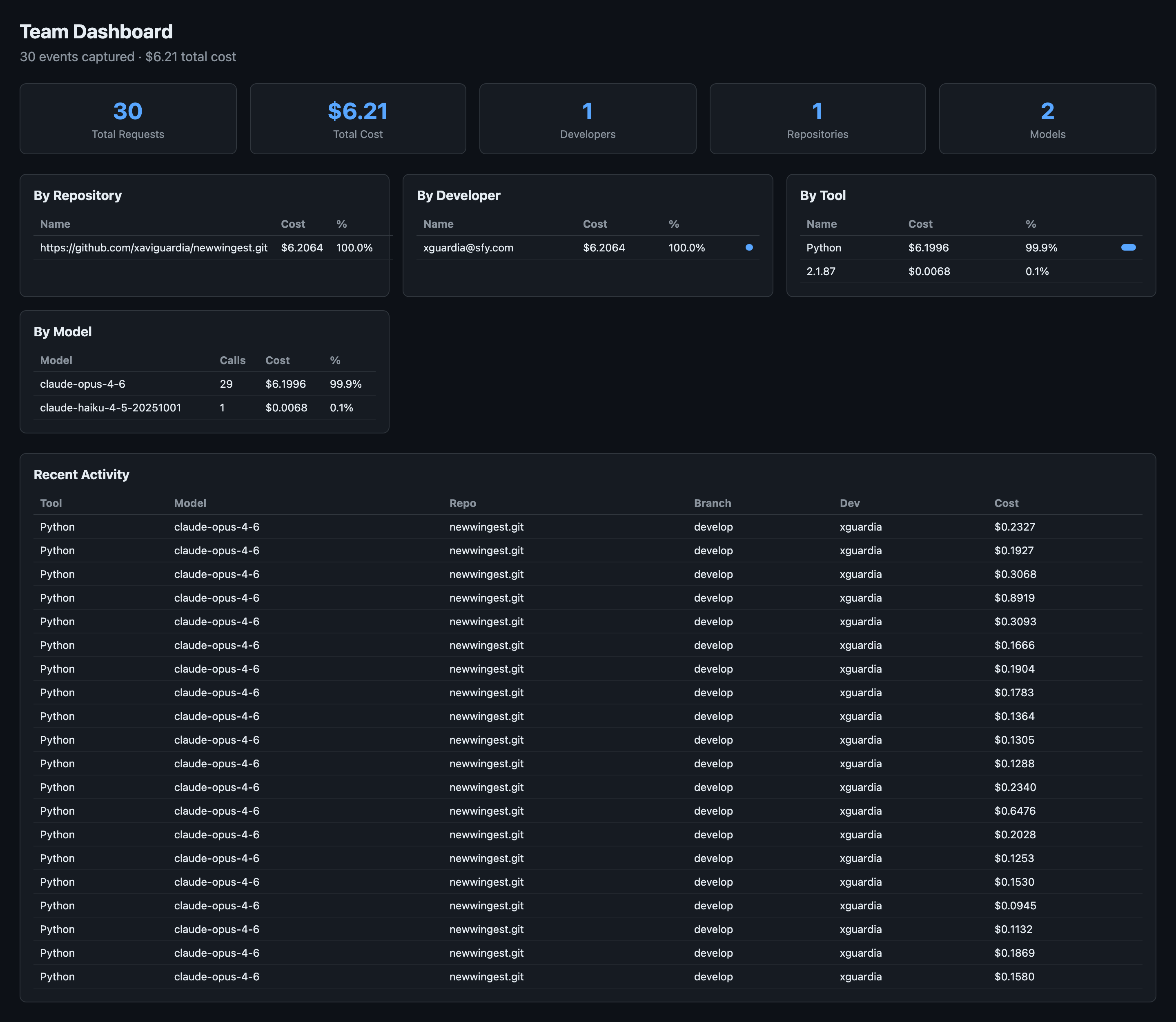
localhost:8800 — Team Dashboard
Team dashboard with cost breakdown

USAGE & COST

Team dashboard + LLM proxy

An mitmproxy plugin captures every prompt and token across Claude, Cursor, Codex, and ChatGPT — attributed to the developer, repo, and branch where it happened. The team dashboard rolls it up.

  • Cost by repository, developer, model, tool
  • Recent activity audit log
  • Works with any tool that talks to an LLM API
$ iria-monitor proxy
$ iria-monitor server

TRENDS

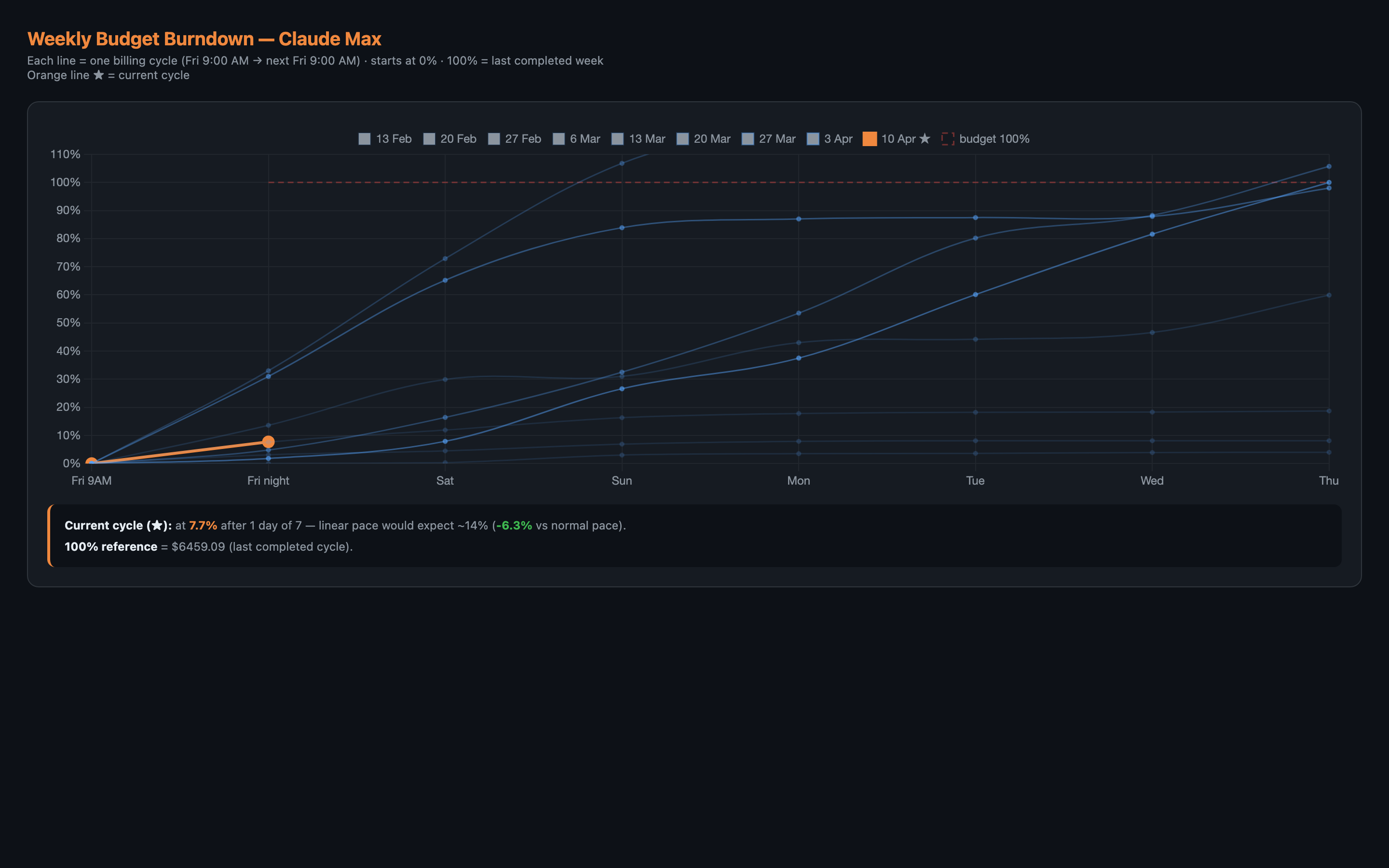
Weekly budget burndown

Each week is a spending cycle. The burndown shows where you are vs the linear pace, vs last week, vs the historical baseline. The chart your team checks every Monday.

  • Multi-week historical comparison
  • Linear pace deviation in real time
  • Annotated cycles with context
$ iria-monitor burndown
Weekly Budget Burndown
Weekly budget burndown chart

TERMINAL

CLI: stats and blame, instantly

No browser needed. Two commands cover the day-to-day: see what your AI is producing and who wrote each line.

iria-monitor ai-stats

$ iria-monitor ai-stats

AI Code Statistics · last 30 days
─────────────────────────────────
Total commits     342
AI-attributed     231 (67.5%)
Lines added       12,847
by AI          8,621 (67.1%)
by human       4,226

By agent
  claude-code           5,914
  cursor                2,103
  codex                   604

Durability (30d)  88.4%
Churn (7d)        6.2%

iria-monitor ai-blame src/auth.py

$ iria-monitor ai-blame src/auth.py

  1 human import os
  2 human import hmac
  3 human from datetime import datetime
  4
  5 claude-code class AuthManager:
  6 claude-code def __init__(self, db):
  7 claude-code self.db = db
  8 claude-code def create_token(self, uid):
  9 claude-code return jwt.encode(...)
 10
 11 cursor def validate(self, tok):
 12 cursor return jwt.decode(...)

CROSS-PLATFORM

Menubar app

A live AI % indicator in your system tray on macOS, Windows, and Linux. Click for today's tokens, cost, durability, and active session — without context-switching to a browser.

$ iria-monitor menubar

Works on macOS, Windows, and Linux (GNOME, KDE, XFCE).

GNOME users: install the AppIndicator extension or libayatana-appindicator3-1 for tray icon support.

$ sudo apt install libayatana-appindicator3-1

Every command in the box

One package. Eleven commands. Zero configuration.

Command What it does
iria-monitor liveLive SSE dashboard at localhost:8765
iria-monitor serverTeam dashboard with cost breakdown at localhost:8800
iria-monitor proxyStart the LLM traffic proxy (mitmproxy addon)
iria-monitor burndownGenerate the weekly budget burndown chart
iria-monitor reportOne-shot HTML usage report
iria-monitor analyzeText-based token usage summary
iria-monitor menubarLaunch the system tray app
iria-monitor installInstall AI attribution hooks for all detected agents
iria-monitor ai-statsShow AI authorship statistics for the current repo
iria-monitor ai-blamePer-line AI attribution for any file in the repo
iria-monitor doctorRun health checks on the proxy and hook setup

One install. Every tool.

pipx install iria-monitor. Free for individuals. Per-seat for teams.